Roadmap
What works today, what is being built now, and the plan for the next twelve months. The board below was drawn in this editor, using the build nodes that are the one thing here no other diagram tool ships.
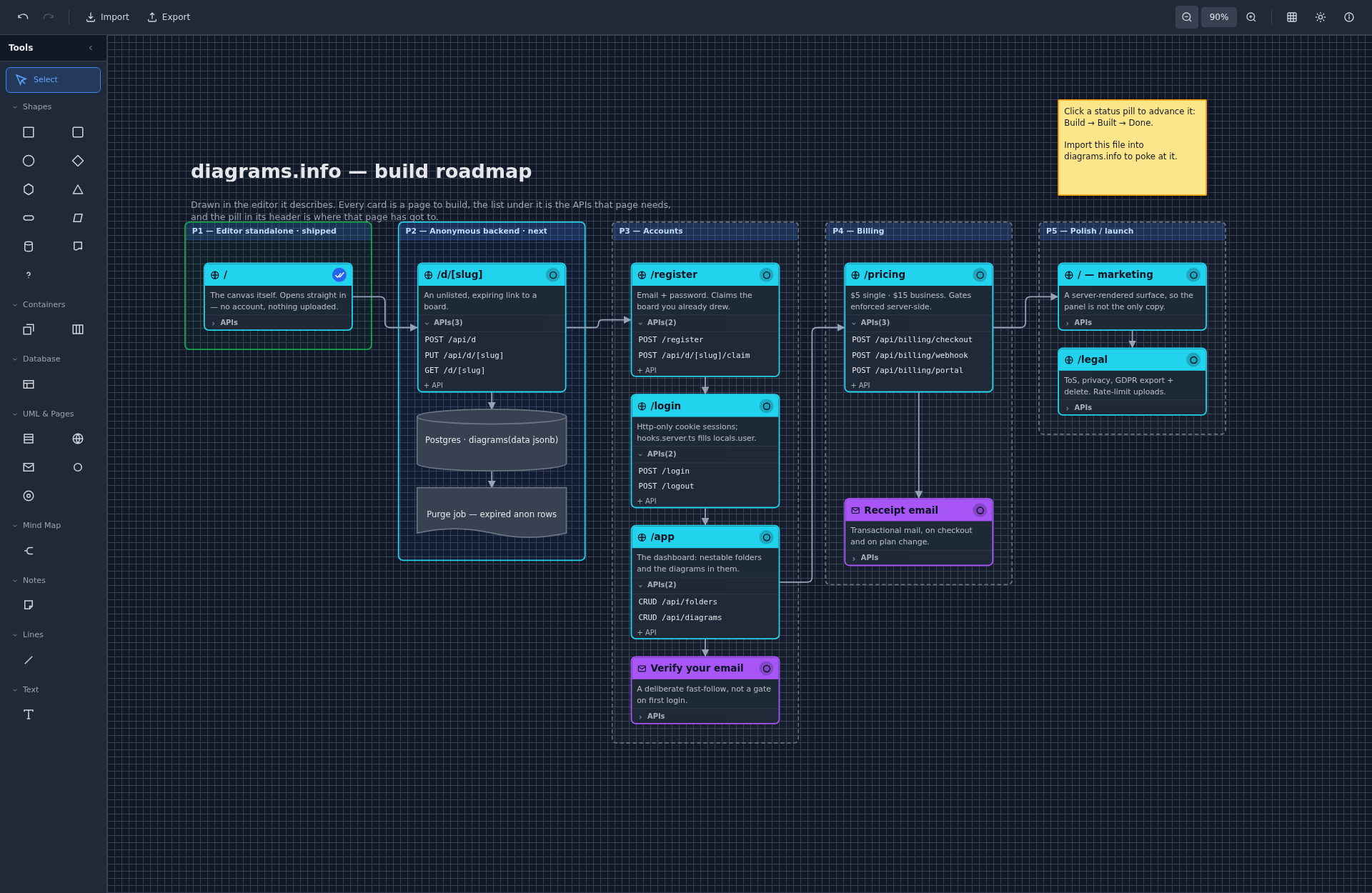
Download the board and open it here with Import → Diagram — then click the status pills and move things around. It is a real diagram, not a picture of one.
Working now
| Lines and polygons New · | A real line between two points, and a Polygon tool that draws an area corner by corner. Drag any end or corner to move it, click between two corners to add one, and select one and press Delete to remove it. |
|---|---|
| Image export New · | Export → Image gives you the whole board as a PNG or an SVG — for a README, a doc or a deck. The SVG is redrawn from the diagram rather than screenshotted, so it stays sharp at any size. Free. |
| The editor itself | Shapes, containers, swimlanes, frames, DB tables, UML classes, mind maps, smart connectors, undo/redo — all of it on the keyboard. |
| DBML in and out | Paste a schema, get an ER diagram with foreign keys drawn row to row. Export it back out again. |
| Light and dark | Plus a canvas grid that fades to faint or off, for a clean screenshot. |
| Local-first storage | Your board is saved in your own browser. Nothing is uploaded to a server. |
Being built
| What | State | Why |
|---|---|---|
| Saving to the cloud | Building | Keep a diagram on the server so it follows you to another machine. Optional — keeping a board only in your browser stays possible. |
| Feedback inside the editor | Building | A Feedback button that reaches me directly, with the diagram attached if you choose to. |
| New elements every week | Building | Two new diagram elements a week for the next year — see the list below. |
The next twelve months
The plan changed on 8 October 2026. Until then cloud saving, sharing and accounts were parked until the editor had an audience; they are now first, because a diagram you cannot send to someone is half a diagram. Dates are a plan, not a promise — when something slips, this page says so.
| When | What | Why |
|---|---|---|
| Oct – Nov 2026 | Cloud saving | Diagrams saved on the server, with a warning instead of a silent overwrite when two tabs edit the same one. |
| Nov – Dec 2026 | Sharing | Every diagram gets one permanent link, diagrams.info/d/…, that you choose to make view-only or editable. Embed it in a README or Markdown file as an image that updates when the diagram does, or in Notion and Confluence. |
| Dec 2026 – Feb 2027 | Real-time collaboration | Several people in one diagram at once, with live cursors. Works offline and catches up when you reconnect. |
| Feb – Apr 2027 | Accounts and teams | Sign in with Google, Facebook or GitHub — no passwords. Folders, team workspaces, version history and comments. |
| Apr – May 2027 | iPad and touch | The editor works with a finger and an Apple Pencil, and installs to your home screen. |
| May – Jul 2027 | Diagram features | Labels on connectors, rotation, more connection points, sequence diagrams and proper floor plans with walls. |
| Jul – Aug 2027 | Team plans and an iPad app | Paid plans for teams, and the editor in the App Store. Image export stays free. |
| Aug – Oct 2027 | What you ask for | The end of the year is kept for the most-requested features. |
New elements, every week
Alongside everything above, two new diagram elements ship every week — about ninety over the year. The order is a starting point: an element someone asks for jumps the queue.
| When | What | Includes |
|---|---|---|
| Oct – Dec 2026 | Flowchart and general shapes | The full standard flowchart set, plus callouts, block arrows, clouds, cards and checklists. |
| Jan – Feb 2027 | Entity-relationship | Chen notation alongside crow’s foot, plus views, enums and schema groups. |
| Feb – Apr 2027 | UML | Use case, activity, state, component and deployment diagrams. |
| Apr – May 2027 | Drawing and media | Freehand pen, images, link cards, code blocks, milestones and Gantt bars. |
| May – Aug 2027 | Networks and cloud architecture | Routers, switches, firewalls and servers, then AWS, Kubernetes, GCP and Azure icon sets. |
| Jul – Aug 2027 | Floor plans | Doors, windows, stairs and furniture. |
| Aug – Sep 2027 | C4, BPMN and wireframes | Plus whatever elements people ask for. |
What it cannot do
Worth saying plainly, because finding out by hitting it is worse. Today there is no real-time collaboration, no account, and no way to share a link to a board — all three are on the list above. It does not work on a touch screen until spring 2027. It is early, and it is labelled alpha for a reason.
If something here is in the wrong order for you, that is genuinely useful to know — tell me on the Facebook page. The story of why this exists explains what it is optimising for.