ER diagram template
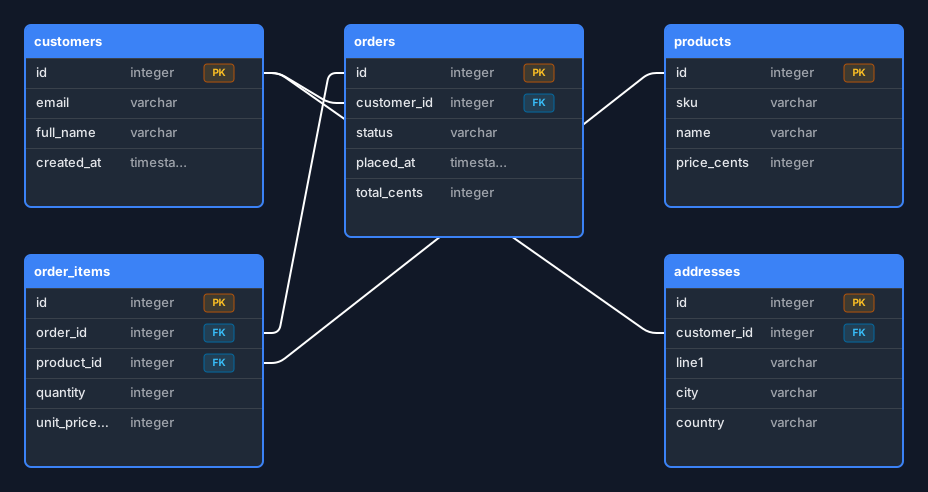
Five tables for an online shop, with primary and foreign keys marked and relationships drawn row to row.
Open this in the editor or download the board
New to the notation? What is an ER diagram? explains entities, keys, cardinality and crow’s-foot notation from scratch, and points back at this board as it goes.
This is the shape almost every shop, booking system or invoicing tool ends up with, so it is a useful place to start even when your domain is not retail. Rename the tables and the structure usually survives.
Two conventions in it are worth knowing before you change anything. orders.customer_id holds the key rather than customers holding an order id, because a foreign key belongs on the many side; and order_items is the join table a many-to-many always turns into — it carries quantity and unit_price_cents, which are facts about the relationship rather than about an order or a product. Both are explained in the ER diagram guide, along with the crow’s-foot markers this board deliberately leaves off: cardinality here is a per-connector styling choice, not something the import guesses for you.
What is in it
- customers, orders, products, order_items and addresses
- Primary keys marked PK, foreign keys marked FK
- Relationships drawn row to row, from the exact column that holds the key
- Column types filled in, so it reads as a real schema rather than a sketch
Editing it
Everything is editable. Double-click a table’s title to rename it, click a cell to change a column’s name or type, and click the badge beside a column to cycle it through PK, FK and nothing. + Add row at the foot of a table adds a column; pressing Tab in the type field of the last row adds one too, so you can keep typing without reaching for the mouse.
Drag a row onto another table’s row to draw a relationship between those exact columns. Click the line to select it, and its toolbar sets the cardinality at each end — one, many, zero-or-one or zero-or-many. If you would rather type than drag, the Code button in the top bar opens a live DBML pane beside the canvas: edit the schema there and the tables follow, or edit the tables and watch the DBML change.
Your board is saved in your own browser as you work. Nothing is uploaded to a server, and there is no account to create.
Read next
- What is an ER diagram? — The notation behind this board, explained without reference to any tool: entities, attributes, primary and foreign keys, cardinality, and how to read crow’s foot without inverting every relationship.
- Turn a DBML schema into an ER diagram — How this board was made, and how to do the same with your own schema: paste DBML, get the tables and relationships drawn, add the cardinality markers, and export DBML back out.
Generated by pasting DBML into the editor’s own Database import and exporting the result, so the board is produced by exactly the code path you would use.