Swimlane flowchart template
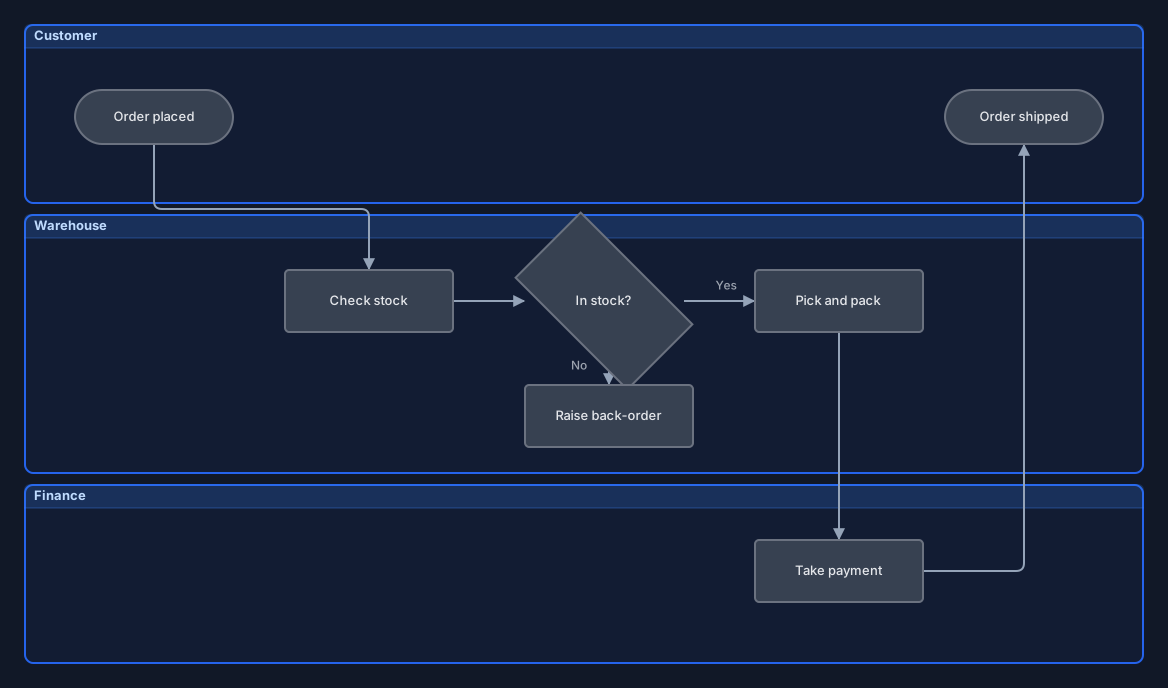
An order-fulfilment process across three lanes, with a decision point and both of its branches.
Open this in the editor or download the board
Swimlanes answer the question a plain flowchart leaves out: not just what happens, but who does it. That is usually the interesting part, because the handovers between lanes are where processes actually go wrong. Rename the lanes to your own teams and the shape normally survives.
What is in it
- Three labelled lanes: Customer, Warehouse and Finance
- Start and end markers, a decision diamond, and its Yes and No branches
- Steps that sit inside a lane and move with it when the lane moves
Editing it
Double-click a lane’s title to rename it, and double-click any step to change its text. Drag a lane and every step inside it moves too. A step belongs to whichever lane its centre is dropped in, so moving a task from Warehouse to Finance is a single drag. Deleting a lane deletes the steps in it as well — move anything you want to keep out first.
To add a step, select one and click one of the small + handles on its left, right or bottom: a new step of the same shape appears on that side, already connected and ready to type into. Drag a handle instead to drop the new step somewhere specific, or onto an existing step to connect the two. The Shape menu in a step’s toolbar turns it into a diamond for a decision, and Swimlane in the Containers section of the tool palette adds another lane.
Click a connector to select it. Drag the handle in its middle to bend the route, drag either end to attach it to a different side, and use its toolbar for arrowheads, dashed lines and colour. The Yes and No labels are free text rather than part of the line or a lane, so move them along with their branch. Export → Mermaid writes the board as a flowchart with each lane as a subgraph.
Your board is saved in your own browser as you work. Nothing is uploaded to a server, and there is no account to create.
Authored as a board and validated by importing it into the real editor, then exported back out, so the shipped file is exactly what the editor produces.