UML class diagram template
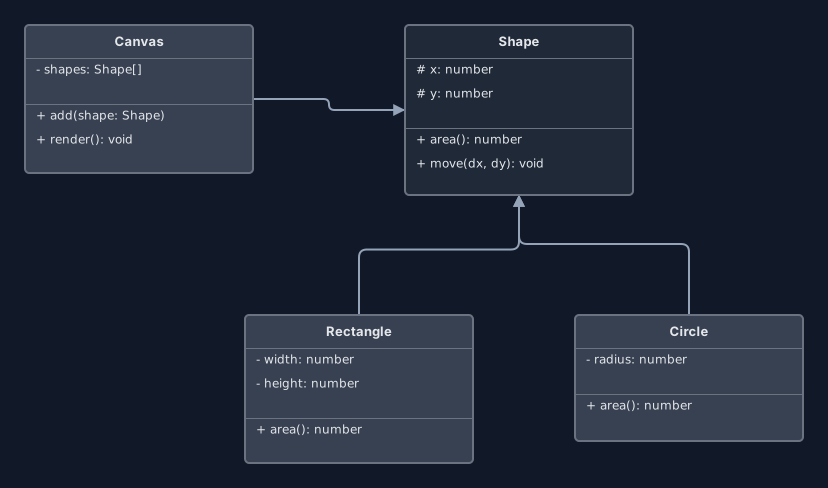
Four classes with attributes, methods and inheritance, in the standard three-compartment notation.
Open this in the editor or download the board
A deliberately small example, because the point of a class diagram is the relationships rather than the exhaustive field list. Shape with two subclasses is the shortest thing that shows inheritance, an abstract-ish base and a plain association all at once.
What is in it
- Canvas, Shape, Rectangle and Circle
- Each class split into name, attributes and methods
- Visibility markers: + public, - private, # protected
- Rectangle and Circle inheriting from Shape
Editing it
Double-click a class’s title bar to rename it. Each attribute and method is its own line: click into it and type. Press Enter in a line to add a new one at the end of that compartment, or use + attribute and + method at the foot of each section; hover a line and an × appears to remove it. The box grows and shrinks to fit. Visibility markers are plain text, so type +, -, # or whatever your notation uses.
Move a class by dragging its title bar. Select a class and click one of the + handles on its sides for a new, empty class already connected to it, or click Connect in its toolbar and then click another class to join two that exist. Select a connector to switch the arrowhead at either end on or off, or make the line dashed for a dependency.
One gap to know about: there is no hollow-triangle arrowhead, so inheritance on this board is a plain arrow pointing at the parent class. If a reader could mistake it for an association, say so in a text note. Export → Mermaid turns the board into a Mermaid classDiagram, members and lines included.
Your board is saved in your own browser as you work. Nothing is uploaded to a server, and there is no account to create.
Authored as a board and validated by importing it into the real editor, then exported back out, so the shipped file is exactly what the editor produces.